Great tools aren’t built in isolation—they’re shaped by the people who use them. Over the past months, you’ve been exploring trails, recording tracks, and sharing feedback about what works and what could work better. We’ve been listening.
Release 1.6.1 represents our commitment to that feedback. This isn’t a flashy feature drop with bold new capabilities. It’s something equally important: a release focused on polish, consistency, and fixing the rough edges that impact your daily experience. From smoother interfaces to more intuitive interactions, these improvements make No Roads work the way you expect it to.
iOS: Consistency, polish, and modern design
iOS users will notice significant refinements across the app, from interface consistency to support for the latest iOS features.
A more consistent experience
One of the most common pieces of feedback centered on consistency—buttons that worked differently in different contexts, interfaces that felt inconsistent between trails and tracks, visual cues that didn’t always match their function. We heard you, and we’ve addressed it.
Unified bottom sheet design: Whether you’re viewing a trail profile, exploring a point of interest, or reviewing one of your recorded tracks, the interface now maintains consistent button layouts and behaviors. No more guessing which button does what depending on where you are in the app—interactions work the same way across all content types.
Clear saved item indication: When you save a trail, waypoint, or point of interest, the save button now provides immediate visual feedback by highlighting. This simple change eliminates uncertainty about whether your action registered, making it instantly clear what’s in your saved collections.
Streamlined collection management: Tap the save button on any saved item and you’ll see a clean dialog offering options to delete the item or manage your collections. This contextual approach keeps collection organization accessible without cluttering the main interface.
Fixed button text wrapping: We’ve resolved an issue where button text would wrap on smaller screens, making some actions difficult to read or tap accurately.
Fresh look for iOS 26
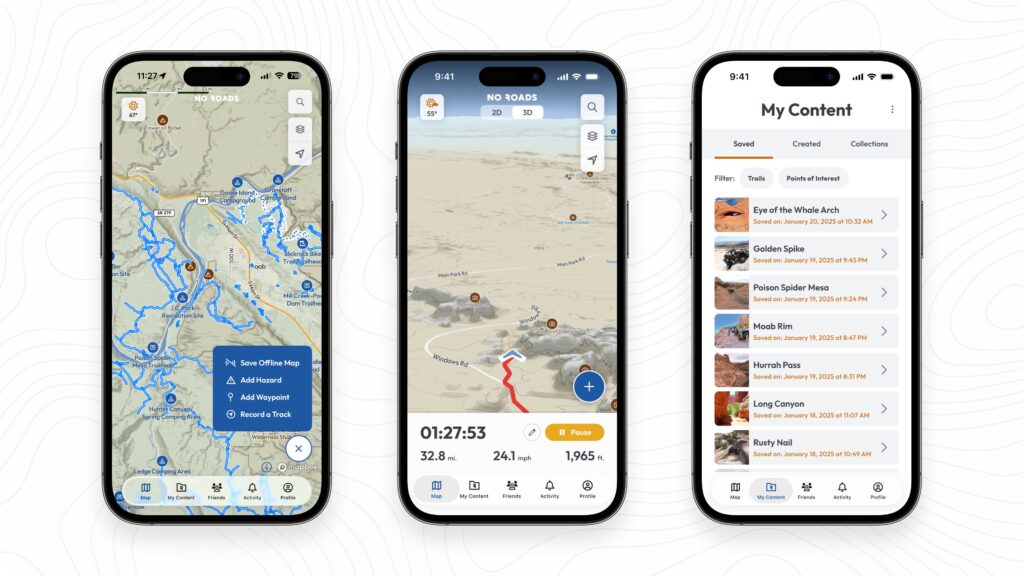
iOS 26 introduced liquid glass visual effects that transform how modern apps integrate with the system interface. Release 1.6.1 brings No Roads in line with these design standards, ensuring the app feels native on your latest iPhone.
Adaptive app icon: The No Roads icon now works seamlessly with iOS’s dark and tinted modes, adjusting its appearance to match your system preferences. Whether you’re running light mode during the day or dark mode at night, the icon maintains visual harmony with your home screen.
Simplified signup experience
Getting started with No Roads is now more streamlined. After creating your account, you’ll go straight to the map rather than through multiple profile setup screens. You can still complete your profile later in settings, but nothing stops you from immediately starting to explore.
Marketing preferences during signup: As part of simplifying the signup flow, we’ve added an optional marketing opt-in checkbox. If you’d like to hear about new features and updates, check the box. Prefer to explore without emails? Skip it. You can always change this preference later in settings.
Marine point of interest sharing
If you explore coastal waters or inland waterways, you can now share marine points of interest with friends just as easily as terrestrial locations.
Android: Performance, precision, and enhanced offline maps
Android users get significant improvements to core functionality, with a special focus on offline mapping capabilities and interface responsiveness.
Smarter offline map downloads
Offline maps are critical for backcountry adventures, and this release makes downloading and managing them more intuitive based on your feedback about the previous experience.
See before you download: When selecting an offline map region, you’ll now see the estimated download size before committing. This helps you make informed decisions about storage management, especially when planning to download multiple regions for extended trips.
Correct map styles: We’ve fixed an issue where offline maps weren’t always downloading the correct visual style, ensuring your offline experience matches what you see when online.
Improved map preview: Tapping the preview image in your offline map list now takes you directly to that region on the main map, making it easier to verify coverage or plan related downloads.
Functional update button: The update button for offline maps now works correctly, making it straightforward to refresh regions with the latest trail data before major trips.
Better waypoint management and visibility
Waypoints are personal markers that make No Roads yours, and we’ve refined how they work based on feedback about visibility control and placement accuracy.
Fixed 3D mode waypoint placement: Previously, if you dropped a waypoint after using 3D map view, it might appear in the wrong location. This is now fixed—waypoints land exactly where you intend them, regardless of whether you’ve been exploring in 3D.
Corrected visibility behavior: We’ve resolved an issue where toggling one waypoint’s visibility could inadvertently affect others. Each waypoint now maintains its own visibility state independently, giving you precise control over what appears on your map.
Smoother map layer interactions
Android users will notice improved scrolling behavior in the map layers list. When you scroll beyond visible bounds, the list now properly continues scrolling up or down rather than stopping unexpectedly—a small change that makes layer management feel more natural.
Enhanced friend list performance
Your adventure network matters, and the friend list now loads faster and responds more smoothly. These performance improvements make connecting with fellow explorers feel more immediate and reliable.
Fixed first-run data loading
We’ve addressed an issue where new installations on accounts with existing user data wouldn’t load map layers properly until you restarted the app. Fresh installs now work correctly from the first launch.
Marine point of interest sharing
Android users can now share marine points of interest with friends, matching the functionality available on iOS.
Marketing preferences
Like iOS, Android now includes a marketing opt-in toggle in settings, giving you control over whether you receive emails about new features and updates.

Why this release matters
Not every release needs to introduce groundbreaking features. Sometimes the most valuable work happens in refinement—fixing the rough edges, smoothing the interactions, and making sure everything works the way you expect it to.
Release 1.6.1 represents our commitment to building a tool that respects your time and intelligence. When buttons work consistently, when interfaces respond predictably, when small frustrations get addressed—that’s when software stops getting in your way and starts supporting your adventures.
This release exists because you took time to share feedback. You reported bugs, described confusing interactions, and suggested improvements. We listened, prioritized, and built solutions. This is how No Roads evolves—not just through our vision, but through our partnership with the community using it every day.
Your feedback shapes No Roads
Every improvement in this release exists because adventurers like you took time to share what was working and what wasn’t. That feedback is invaluable—it helps us understand how No Roads fits into your real-world adventures and where we can make your experience better.
We’re always listening. Whether you’ve found a bug, have an idea for improvement, or just want to share how you’re using No Roads on the trail, we want to hear from you. Your insights help us build the best outdoor recreation mapping app possible.
Share your feedback: Have thoughts about this release or ideas for what’s next? Submit your feedback here and help shape the future of No Roads.
Update and experience the improvements
Release 1.6.1 is rolling out now on both iOS and Android. Update your app to experience these refinements the next time you’re planning an adventure or recording a track.
These improvements set the foundation for what’s coming next. With rough edges smoothed and core interactions refined, we’re positioned to build the next wave of features on a solid, polished base.
Thank you for your feedback, your patience, and your continued enthusiasm for No Roads. Keep exploring, keep sharing what you discover, and keep telling us how we can make the platform better.
Any terrain. Any adventure. No limits. No Roads.